FlashZilla Software and Guides
FlashZilla v3
Warning to 2010-2014 VW/Audi 2.0L TDI owners:
If you have a Golf, Jetta, or Beetle, then before you start writing anything to your ECU, you should continuously charge your battery at 12.5v to 13.5v or remove the radiator fan fuse. If you do not have a battery charger, then you can run jumper cables to another car that is running.

Warning to all VW/Audi owners with Polar FIS aftermarket device:
If you have a Polar FIS device (an aftermarket product that customizes your instrument display), then it is strongly recommended that you remove it before reading or writing your ECU. We have received reports of engine start failure or weird instrument glitches. You can re-install Polar FIS after you have finished reading or writing your ECU.
Instructions
- Click here to download the FlashZilla v3 Windows software.
- Connect the FlashZilla 3 device to your computer using the provided USB cable (any A to mini-B USB cable will work).
- Start the FlashZilla 3 software on your computer and it should automatically detect the device, as well as update it (it may take 5 minutes).
- Disconnect the device from your computer, then connect it to your vehicle using the supplied OBD2 cable. The OBD2 port is usually located under the dashboard, just to the left of the steering wheel.
- Tap the "Tuning" icon (the first icon) in the FlashZilla 3's screen. Follow the prompts to read your car's original file. If you have a:
- 2000-2003 Jetta, Golf, or Beetle 1.9L TDI, then choose engine code ALH under VW Jetta, Golf or Beetle.
- 2004-2006 Jetta, Golf, or Beetle 1.9L TDI, then choose engine code BEW under VW Jetta, Golf or Beetle.
- 2004-2004 Passat 2.0L TDI, then choose engine code BHW under VW Passat. You may also try BEW engine code under Jetta, Golf, or Beetle.
- 2009-2014 Jetta, Golf, Beetle, or A3 TDI, then choose engine code CJAA under VW Jetta.
- 2012-2014 Passat TDI, then choose engine code CKRA (under Passat VII). You may need to download the full template file linked above.
- 2015+ Jetta, Golf, Passat, or A3 TDI, then choose engine code CUUB under VW Jetta, or CRLB.
- any 2011+ 3.0L TDI (VW, Audi, and Porsche Cayenne), then choose engine code CRCA under VW Touareg, or CNRB.
=======================================================================
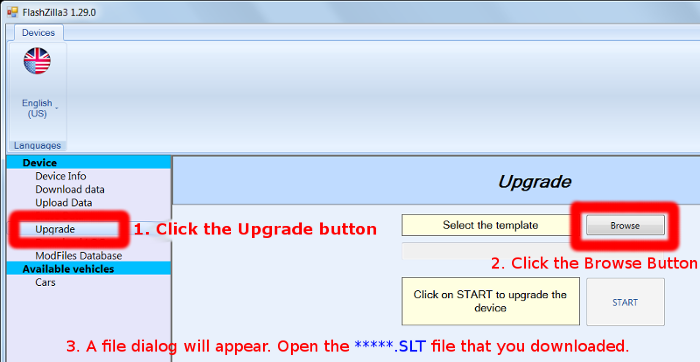
- If you don't see your vehicle (ECU) listed, then you can download updated template files below. Click here for installation instructions.
- DO NOT CHANGE YOUR TEMPLATE TO THE WRONG SCREEN, all newer devices will be 4.3", please contact us if you're unsure.
- For larger 4.3" screen FlashZilla v3+:
- For smaller 3.5" screen FlashZilla v3:
========================================================================
Once the reading operation is complete, take the device back to your computer and in FlashZilla software click "Download data."
Customers:
- If you purchased a tune from a 3rd party (dealer), then you must process your tune through them.
- If you purchased a tune directly from us, then upload your file in a Ticket at https://tickets.tunezilla.com/tickets (please register and create a new ticket if you don't already have one). Please include all of your information and your specific tune request.
Dealers: Create a https://tickets.tunezilla.com/tickets and you must include all customer information (first & last name, vehicle modifications, and the exact tune needed).
After you receive a tune file from us, load it onto your FlashZilla via the FlashZilla software on your computer.
A battery charger or jump cable (connected to another car that's running) is recommended to stabilize your car's power during the ECU write operation. THIS IS REQUIRED for 2010-2014 Golf, Jetta, and Beetle. Pulling the radiator fan fuse is an alternative, but using a charger is still recommended.
Please contact us if you need assistance: https://tickets.tunezilla.com/tickets/new
Troubleshooting Common FlashZilla v3 Problems:
| Problem | Cause | Solution |
|---|---|---|
| FlashZilla v3 screen shows "Tuning File is Empty" | There is no tune loaded in the FlashZilla | You must upload your downloaded tune file from your computer to the FlashZilla device. |
| FlashZilla v3 screen shows "Calibration Error ... " | FlashZilla could not download your stock file from an online database | Please report the Calibration error to us and give us the full code. We will check if we have a stock file that we can add to the online database. |
| "ERR_INVALID_FILE" while trying to load tune from computer to FlashZilla | The tune file that you downloaded may be corrupted, or your computer has difficulties with transferring it to the FZ | Try loading the file from your computer to FZ a few more times. If that fails, then please save a new copy of the stock file from your FZ to the computer. Send that to us so we can reprocess the tune for you. |
FlashZilla v2
Download the 4.08 software here.
Download the PDF guide here.
Troubleshooting: If you see a "FTD2XX.DLL" error while operating FlashZilla software in Windows, then unplug the FlashZilla device from your computer, download and install this software, and try again.
Rental tools available in place of the V2 for all VW TDIs up to 2006, along with pre DEF Mercedes products (08 and older, and 09 and older sprinter), and Jeep CRDs. The fee is $50 with a 500 deposit, or a 200 deposit for ALH motors (2000-2003 MY golf/jetta).
Rentals
There is a $50 fee plus up to a $500 deposit required to rent this tool. Please contact us if you have questions or if you'd like to rent. Please return these tools in a reasonable time-frame. If you cannot ship it within a few days of receiving your tune from us, then please contact us. We will charge $50/week if the tool is held for more than two weeks after the software has been sent, up to the purchase price of 900 USD. This tool is of no use without software, which cannot be provided to a missing tool.
Troubleshooting Common FlashZilla v2 Problems:
| Problem | Cause | Solution |
|---|---|---|
| "Master Error 2" while you try loading a tune file into FlashZilla | The tune file is no longer matches your original Read file. This can happen if you erased the FlashZilla or if you Reread the vehicle after you sent us your original Read file. | Save a fresh Read file and send it to us, then we will process a new tune. Please avoid erasing or reading with FlashZilla again. |
| "Master Error 1" while you try loading a tune file into FlashZilla | The tune file does not match this device, which must be a "FlashZilla" brand. Our tune files will not work with different brand devices. | While ensuring that the device you are using is a FlashZilla brand, it may be necessary to re-read the vehicle and send us the new read file. While waiting for a new tune file from us, please avoid erasing the device or another read. |
| "Security Error" while you try to read the vehicle | The vehicle's ECU may have an existing tune that is blocking your OBD2 read/write operation. In other words, another tuner may be preventing you from being able to re-tune the vehicle. | Pulling your ECU out and shipping it to us for bench-flashing is one potential workaround. Please contact us to discuss. |